
You can use the weighted average function in TopSURV if you repeat an observation on a point in topo by using the same point number. I will generally use this feature when setting control with RTK.
 1. Make an observation on your control point. I recommend collecting an average of 30 epochs or more.
2. After logging your point make a second observation on the same point using the same point number.
3. When prompted select Use as a Check point, Use in weighted average.
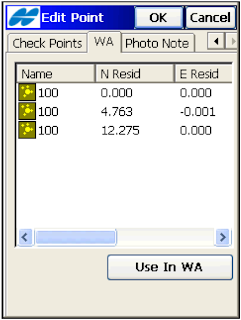
If you use more than two observations you can throw out any outliers in the weighted average tab.
From the TopSURV User Manual: The WA (Weighted Average) tab appears on the Edit Point screen if the point has check points which are used in a weighted average. To exclude a station from a weighted average, highlight the station. Use the Exclude from WA / Use in WA button to exclude / include the highlighted station in averaging.
>See this walk through video
 1. Make an observation on your control point. I recommend collecting an average of 30 epochs or more.
 2. After logging your point make a second observation on the same point using the same point number.
3. When prompted select Use as a Check point, Use in weighted average.
If you use more than two observations you can throw out any outliers in the weighted average tab.
From the TopSURV User Manual: The WA (Weighted Average) tab appears on the Edit Point screen if the point has check points which are used in a weighted average. To exclude a station from a weighted average, highlight the station. Use the Exclude from WA / Use in WA button to exclude / include the highlighted station in averaging.
>See this walk through video
